
A heads-up display for your PC, on a little second screen.
Sanity H.U.D. fills a small, wide USB screen with everything your PC is doing: CPU and graphics card load and temperatures, frames per second in your game, fans, drives, network, power use and plain-English warnings. It's always in view, and nothing ever covers your game.
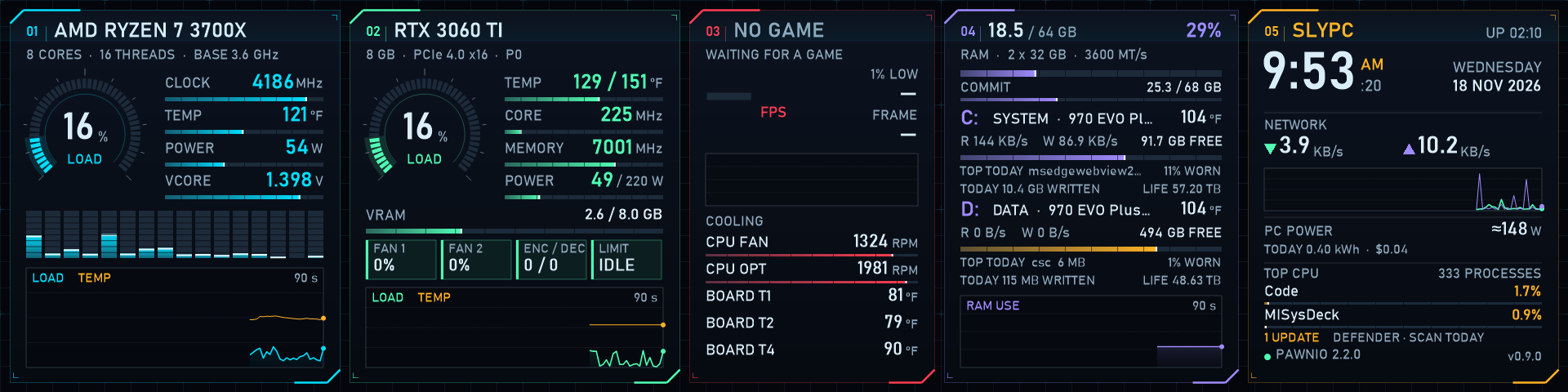
The live page, captured straight from a 1920×480 screen. The five panels are processor, graphics card, game and cooling, memory and drives, and system.
Why a separate little screen?
Your game keeps the main monitor
On-screen overlays cover part of the picture, and alt-tabbing to a monitoring app pulls you out of the game. A second screen shows everything at once without touching the game at all.
Wide and short fits anywhere
"Bar" screens around 1920×480 pixels (roughly 9 to 12 inches wide and 2 to 3 inches tall) fit under or above a monitor, on a stand, or inside a case with a glass side. They're inexpensive and plug in by USB-C or HDMI.
Trouble shows up early
A fan that stopped, a drive filling up or a graphics card getting hotter week after week are easy to miss. A screen that's always on makes them hard to miss, and Sanity H.U.D. tells you what each warning means.
What it shows
Load, clock speed, temperature, power and voltage, a bar for every thread, and a 90-second graph.
Load, core and hotspot temperatures, clocks, power against its limit, video memory, fans, and what's holding the card back (power, heat or nothing).
Frames per second, the 1% low and frame time for whatever is in front, plus your motherboard fans and temperatures. Every game session is logged.
Memory use, and for each drive: free space, speed, temperature, wear, and which program has been writing to it.
Clock and date, network speed, estimated power use and today's electricity cost, the busiest programs, Windows Update and Defender status.
Tap the screen for more pages: full detail, your game history, trends over weeks (is the GPU running hotter? did a driver update make a game smoother?) and the Windows event log in plain English.
Warnings you can understand
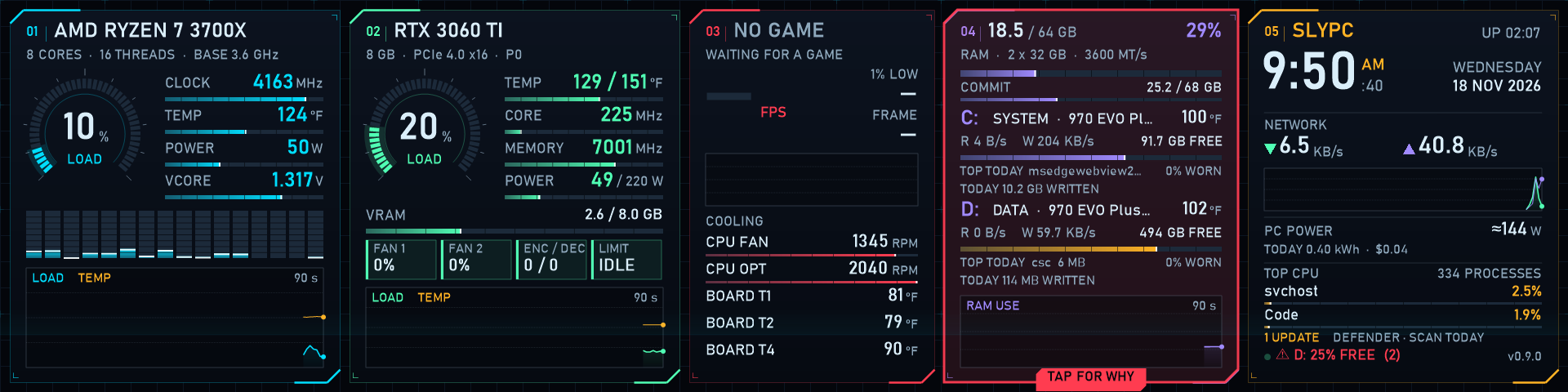
When something needs a look, its panel pulses amber or red and shows a TAP FOR WHY tab. Here we've set the "drive nearly full" warning higher than usual so you can see it.
Tap the blinking panel and Sanity H.U.D. explains what's wrong, why, and what to do about it, in plain words. Dismiss stops the blinking. It doesn't hide the problem for good: an ongoing problem comes back if it clears and then happens again, and a logged error comes back only when a new one happens.
Private by design
Sanity H.U.D. reads your own PC and keeps everything on it. It has no account, no ads, no tracking and no telemetry. The only thing it ever does online is a once-a-day check on GitHub for a newer version of PawnIO, the sensor driver it uses. If something doesn't work on your PC, it can save a hardware report for you to e-mail us, and you see every line of it first.
Get it
- Sanity H.U.D.: the download from this site.
- PawnIO: a free, signed sensor driver from another developer, from its official site
pawnio.eu: click Download Now, run
PawnIO_setup.exe, then sign out of Windows and back in.
Without PawnIO, the CPU temperature, CPU power, VCORE and fans stay blank (or read 0); everything else works. More about PawnIO.